
There are many informational articles and books out there that describe all the amazing benefits of having a business blog. I don’t disagree with them (since I’m writing one here). I’ve seen my site traffic increase, search engine rankings increase, and started conversations with people that I would never hope the meet “in the real world”. So I think there’s no debating the fact that there are many benefits to blogging and talking about your particular expertise.
What I wanted to do here is to set down some step-by-step instructions for the “regular” guy or gal that wants to get started with a solid foundation with a self-hosted WordPress blog. There are many terrific blogging platforms available, most available at little or no cost. I’m a fan of WordPress myself, mostly because it’s what I’m used to using. This post is some steps that I’ve learned along the way that will hopefully help you to:
- Set up your blog easily
- Make sure it’s safe from hackers
- Give you some basics that will get you started to a successful blog
This is by no means a comprehensive list, nor is it intended to be. It’s merely a compendium of things that I’ve learned along the way that can help you get going with a minimum of effort, and these are the exact same steps I take for my clients who want me to do it for them. You can host your blog with WordPress directly free of charge. However, if you host your blog with your Web site, it becomes part of the Web site – really just an extension – and can benefit you from an SEO perspective.
List Of Resources To Get Started
Before you can start with any of this, you have to have some basic materials. I’ll assume you already have a working computer with a reasonable internet connection. Beyond that, you will need:
- A Web hosting plan that supports both PHP and a MySQL database. I prefer CrystalTech, but you can use any hosting as long as they support PHP and MySQL databases.
- FTP software – This is to move files to your hosting platform. I like IPSwitch’s WS_FTP Professional, but there are many free tools available as well.
- Text editor – You can use Notepad or any pure text editor like TextPad, as long as it doesn’t apply formatting (for instance, do NOT use MS Word or Works).
Assuming you have all this, let’s get started with setting up a WordPress blog.
Download WordPress Software
The first step is that you need to get the software. Go to the WordPress.org Web site, and click the big button that says “Download WordPress 2.8.5” (or whatever the current version is). Save the zip file to your hard drive, and unzip (uncompress) it to a folder that’s convenient to get to.
Create a MySQL Database
Go to your hosting platform and create a MySQL database. Usually you can do this through your Control Panel. You’ll need to know the following:
- The database host server (sometimes it’s “localhost”)
- The database name
- The user id to connect
- The password
Usually you can specify everything but the host, so pick a secure password that includes letters and numbers.
Upload the WordPress Software
 Connect to your Web hosting with your FTP software, and create a folder that you want the blog to live in. I usually just create a folder called “blog”, but you can call it what you want. If you want the blog software to actually be your Web site, you don’t need to create a folder. Just upload all the files and folders to the root directory of the Web site. This is about 7.1MB of files, so it shouldn’t take very long if you have a decent connection.
Configure the WordPress Blog Software
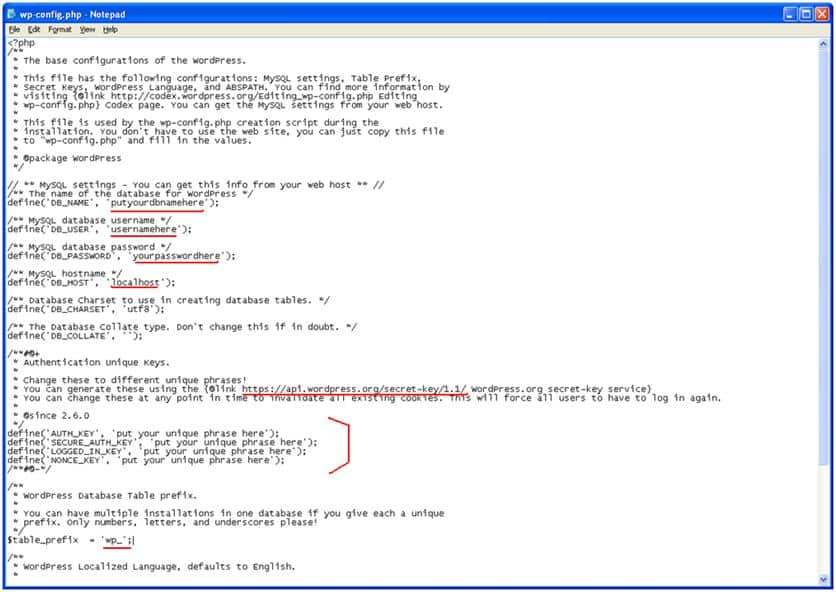 You’ll find a file called wp-config-sample.php. You need to edit this file with a text editor. You can either edit the local copy on your computer, or edit the one on the Web. Enter the database server, database name, user name, and password where it shows these settings in single quotes (see red underlines in the sample graphic).
Next, you must create a unique authentication key by going to the WordPress authentication key site. Copy and paste the four lines into the config file where it shows the sample lines.
Security Tip #1
The last and most important change is to make sure that you change your Table Prefix. Most hackers know that the default prefix is “wp_”, so change it to something totally random, like “wp_2H5i7U1ba”. Just add some random upper and lower case letters and numbers. This will make it much harder for a hacker to break into your database.
Save the file. Rename it as wp-config.php and either upload it from your computer, or just rename the one that’s on your Web site.
Kick Off The Installation Process
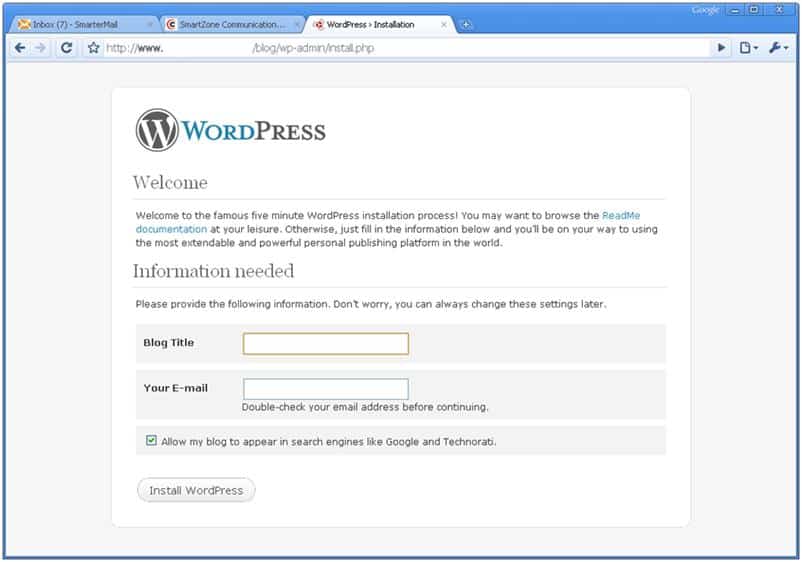 Open your browser and go to the Web site with the directory into which you installed the WordPress software. So if it’s in the /blog directory, go to http://www.yourdomain.com/blog and the installation process should automatically kick off. If it complains that it can’t connect to the database, check your config file to make sure you entered all the database information correctly.
It will automatically create an admin id and password. Print this page out! If you forget the password, or don’t write it down, you have to delete the database and start all over.
Security Tip #2
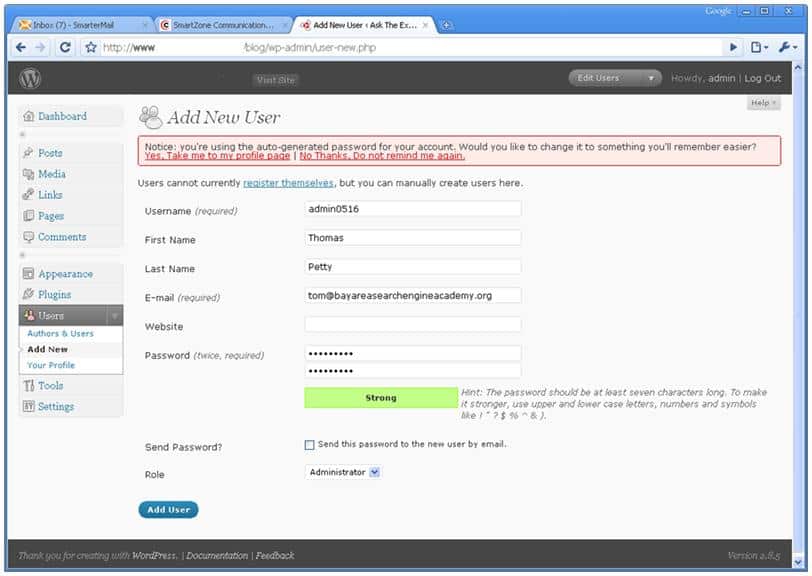 Before you do anything else, create a new admin id that is something like “admin0512” (or a name that means something to you) and very secure password using upper and lower case letters, numbers and special characters. The meter will show you how secure your password is. Hackers know that the default admin id is “admin”, and will try to hack it. Now log out, log in with your new admin id, and delete the original admin id. This is critical to prevent hackers from getting into the site (or at least slow them down).
Apply a Theme
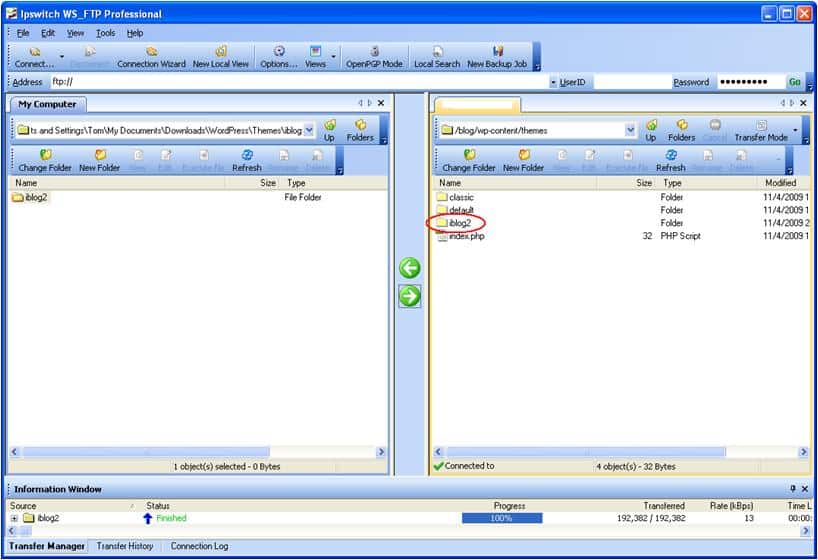 There are lots of free themes (looks) that people have developed. Find one that has four or five stars and apply it to your site. The ones that have high ratings and have been downloaded thousands of times have been tested and upgraded so that they work the best for you. You can always customize it with your logo and other changes later.
Install Plugins
 I have a specific set of plugins (which are additional functionality that doesn’t come with the base WordPress software) that add value. I recommend that at a minimum, you install these:
- XML Sitemaps – Creates XML sitemaps for Google automatically, which is great for getting indexed
- Google Analytics for WP – Set up your Analytics code so you can track all the throngs of people reading your blog
- All In One SEO Pack – Has great SEO tools for your blog
- Akismet (already installed, but be sure to activate it) – It catches all the comment spammers and blocks them
- WP Security Scan – Gives you a report to see if your WordPress blog is fully safe from hackers
- WP DB Backup – Allows you to back up your database before you make any changes. ALWAYS back up your database before you upgrade or do anything!
Configure Your Ping Servers
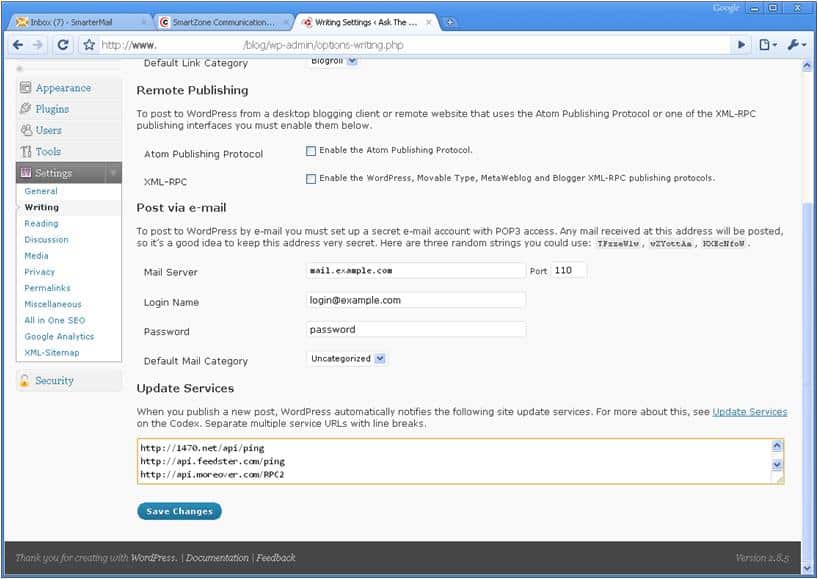 WordPress comes pre-configured with a single ping server, but you’ll want to add more. Every time you create a blog post, you want to make sure that the search engines know about it. When you click “Publish”, WordPress will go tell all the ping servers that you’ve configured to notify the search engines about your new post. This is my list of ping servers. Just copy and paste the list into the configuration screen, and click save.
Configure Your Permalinks
Permalinks is a setting that tells WordPress how to display the links to your blog posts. We all know that you want your keywords in the link text if you can. The default setting for WordPress doesn’t give a very SEO-friendly link, so I recommend that you change it. Many people debate about the “right” way to set them up. Set them, and don’t worry about it. Most people set them to:
/%category%/%postname%
which will display your posts with a subdirectory of the post “Category”, then the actual words from your post title.
Now, you’re done and ready to start blogging. You might want to go to Technorati.com and register your blog there too.
Wow…great stuff. I did not know all of this. Thanks for taking the time to create this step by step tutorial! I get people asking me how to set up their blog, and I will refer them to your post.
My pleasure Nancy. Hope it helps you get set up easily!
This is very good and extremely helpful. That list of ping servers is golden! Glad Nancy referred me to a new blog to follow.
Thanks, Juli! 🙂
Thomas, I attended your webinar on this subject and didn’t have all this information in my notes so I’m extremely glad you posted this information. Cheers, Shawn
This is very informative Thomas. Easy to follow. It’s great that you posted it here.
Great article. I’m curious, would you recommend hosting a blog directly on my website (and the blog accessible via main header navigation) OR hosting the blog separately with links pointing back to my website? Which is better for SEO?
Thanks, Clayton. Either way will work for you. The important thing is to use your key words in your links back to your Web site that point to pages that are associated with those key words (not just the Home page). You should also cross-link the individual blog posts with each other by key word linking them too. You can always go back in and edit old posts to link to new posts, which helps build link reputation. Hope that helps.
Great overview very relevant still! Any new updated suggestions on security measures for wordpress since 2010?
Hi,
It is really nice to read and make to create a new word press blog in a more innovative manner. I would like to thank you. Most of the people common problem is failure in creating genuine word press blog with more innovative way.
Definitely i can retrieve this problem by reading above article. I would like to request you to please do post such an articles, which help full to build more generic value based content in the blog.
Thank you.
Hi Thomas Petty,
I would like to thank you first for giving such a wonder full stuff. Really it helps me great. Actually i am struggling to add plug-ins to my blog and server configure also getting difficulty from last few weeks. This problem solved with the simple steps subjected in the above content. Keep forward with good stuff. I would like to hear about SEO optimizing steps. Please try to post. It will helps me more.
Thanks